
Installing QuickBooks Desktop should be simple, but sometimes errors appear and stop the process. These errors may look confusing, but most of them have simple reasons and easy solutions.
In this detailed guide by Taxbookhelpline, we will explain each error step-by-step in very easy language, so anyone—even without technical knowledge—can understand and fix it.
What Are QuickBooks Installation Errors?
QuickBooks installation errors happen when the software cannot install properly on your computer.
Think of it like building a toy with instructions. If a part is missing or something blocks you, the toy cannot be completed. In the same way, QuickBooks needs proper system files, permissions, and settings. If anything is missing or blocked, installation fails.
Main Reasons Behind QuickBooks Install Errors
Before fixing the errors, it is important to understand why they happen:
- Your system does not have proper permissions
- Important Windows files are missing or damaged
- Antivirus or firewall blocks installation
- Microsoft components like .NET Framework are not working properly
- The QuickBooks setup file is incomplete or corrupted
QuickBooks Error Code 1303
What This Error Means
Error 1303 appears when QuickBooks does not have permission to access a required folder on your system.
Simple Explanation
Your computer is not allowing QuickBooks to enter a folder it needs.
Step-by-Step Solution
- Press Windows + E to open File Explorer
- Go to the C drive and open the ProgramData folder
- Right-click the folder and select Properties
- Click on the Security tab
- Select Users and give Full Control permission
- Click Apply and OK
Now try installing QuickBooks again.
QuickBooks Error Code 1935
What This Error Means
This error occurs when Microsoft components fail to install properly.
Simple Explanation
QuickBooks needs help from other Microsoft tools, but those tools are not working correctly.
Step-by-Step Solution
- Restart your computer
- Temporarily turn off antivirus software
- Repair or install Microsoft .NET Framework
- Install Microsoft Visual C++ Redistributable
- Run Windows Update
After completing these steps, reinstall QuickBooks.
QuickBooks Errors 1601, 1603, and 1642
What These Errors Mean
These errors are related to Windows Installer not working correctly.
Simple Explanation
Your system’s installer tool is not active or is damaged.
Step-by-Step Solution
- Press Windows + R
- Type services.msc and press Enter
- Find Windows Installer in the list
- Right-click and click Restart
If the issue continues, use QuickBooks Tool Hub to fix installer issues.
Read also : QuickBooks Error Code1603, 1601, and 1642
QuickBooks Error 6144, 82
What This Error Means
This error is usually related to company files but can also occur during installation due to network or firewall issues.
Simple Explanation
Your system or network is blocking QuickBooks from working properly.
Step-by-Step Solution
- Turn off antivirus temporarily
- Allow QuickBooks through the firewall
- Try installing QuickBooks in Safe Mode
- Ensure stable internet connection
QuickBooks Error Code 1321
What This Error Means
This error appears when QuickBooks cannot write data to a file.
Simple Explanation
QuickBooks is trying to save something, but your system is not allowing it.
Step-by-Step Solution
- Run QuickBooks installer as Administrator
- Update Windows to the latest version
- Disable antivirus during installation
- Check folder permissions
Read also: QuickBooks Error Code 1321
QuickBooks Installation Error 1920
What This Error Means
This error occurs when the QuickBooks Database Server Manager fails to start.
Simple Explanation
A required service needed by QuickBooks is not starting.
Step-by-Step Solution
- Press Windows + R
- Type services.msc and press Enter
- Find QuickBooksDBXX service
- Right-click and click Start
After that, continue the installation.
QuickBooks Error 1402
What This Error Means
QuickBooks cannot access certain registry entries in Windows.
Simple Explanation
The system registry (a storage area of settings) is blocked or restricted.
Step-by-Step Solution
- Run installation as Administrator
- Fix registry permissions
- Use QuickBooks Install Diagnostic Tool
- Restart your system and try again
QuickBooks Error 2908
What This Error Means
This error is related to issues with Microsoft components.
Simple Explanation
Some required files are not registering correctly in your system.
Step-by-Step Solution
- Repair Microsoft .NET Framework
- Run Windows Update
- Restart your computer
- Reinstall QuickBooks
Best Tool to Fix QuickBooks Installation Errors
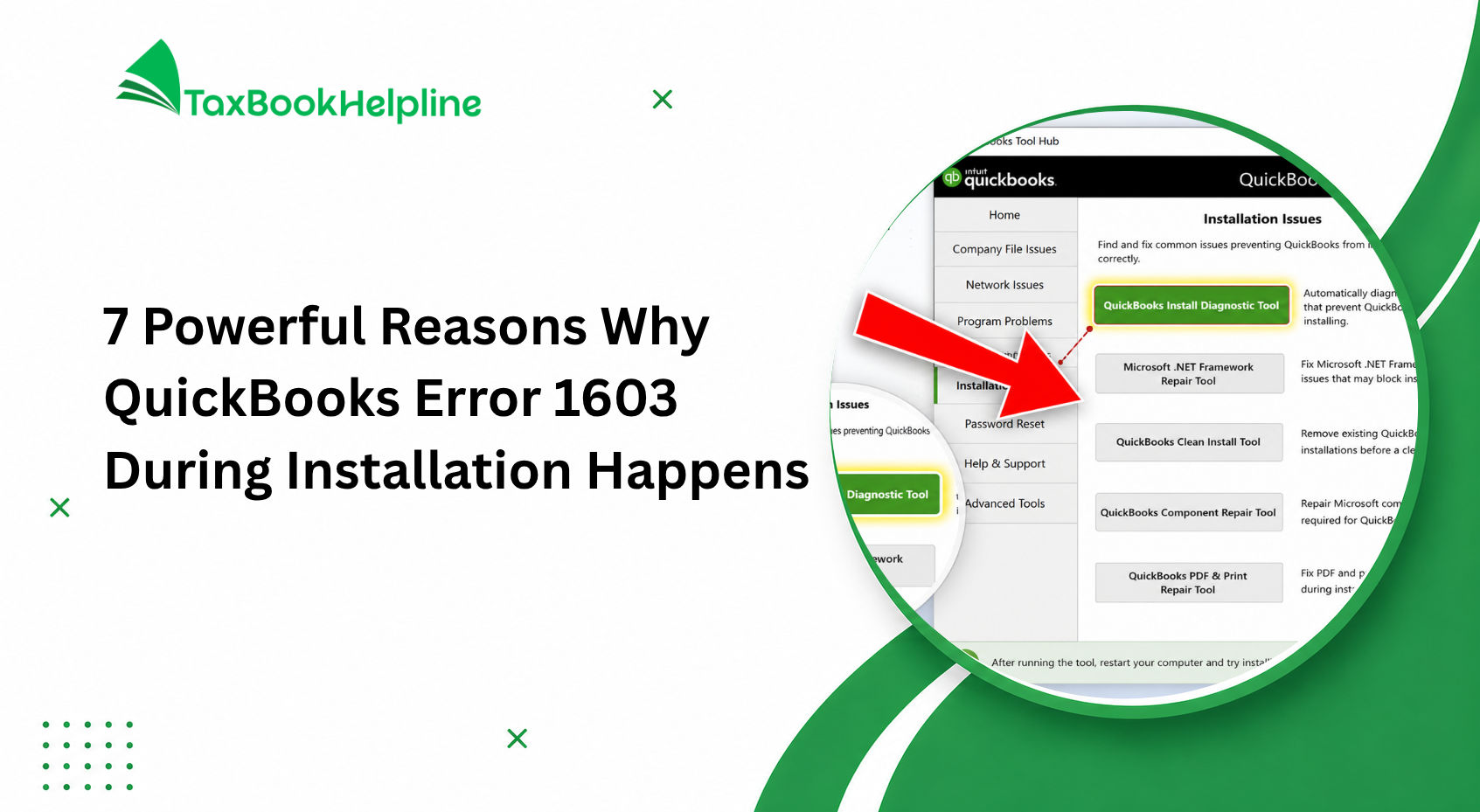
One of the easiest and most effective ways to fix QuickBooks installation issues is by using the QuickBooks Tool Hub. This official tool from Intuit helps diagnose and repair common installation errors automatically.
How to Use QuickBooks Tool Hub
- Download and install the latest version of QuickBooks Tool Hub
- Open the tool on your computer
- Click on Installation Issues
- Select QuickBooks Install Diagnostic Tool
- Let the scan run completely
- Restart your computer after the process finishes
The QuickBooks Install Diagnostic Tool can automatically fix many installation-related errors, including damaged Microsoft components, missing files, and setup issues, saving you time and manual troubleshooting effort.
Important Tips Before Installing QuickBooks
Before starting the QuickBooks installation process, it’s important to prepare your system properly. Following these simple yet essential tips can help prevent installation errors, setup interruptions, and performance issues.
1. Log In as Windows Administrator
Always use a Windows Administrator account while installing QuickBooks. Administrative permissions are required to install files, configure settings, and complete the setup successfully.
2. Temporarily Disable Antivirus and Firewall
Sometimes antivirus or firewall programs may block QuickBooks installation files. Temporarily disable them during installation and enable them again once the setup is complete.
3. Update Your Windows Operating System
Make sure your Windows system is fully updated. Installing the latest updates improves compatibility and helps avoid installation-related problems.
4. Use a Stable Internet Connection
A fast and reliable internet connection is important for downloading installation files, activating QuickBooks, and verifying license information without interruptions.
5. Download QuickBooks from a Trusted Source
Always download QuickBooks from an official or trusted source to avoid corrupted or unsafe installation files that may cause setup errors.
6. Restart Your Computer Before Installation
Restarting your system helps close unnecessary background processes and reduces the chances of installation conflicts.
7. Check System Requirements
Before installation, verify that your computer meets the minimum system requirements for the QuickBooks version you are installing.
8. Backup Important Data
Creating a backup of your important business and accounting data is always recommended before installing any software.
9. Close Background Applications
Close all unnecessary programs running in the background to ensure a smoother and faster installation process.
10. Keep License Information Ready
Have your QuickBooks license number and product code available before starting the installation to avoid interruptions during activation.
FAQs ( Frequently Asked Question )
Why does QuickBooks installation fail repeatedly?
QuickBooks installation can fail due to missing system files, incorrect permissions, or interference from antivirus software. In many cases, damaged Microsoft components like .NET Framework also cause issues. Ensuring your system is updated, running the installer as administrator, and using QuickBooks Tool Hub can resolve most repeated installation failures easily.
Is it safe to disable antivirus while installing QuickBooks?
Yes, it is generally safe to temporarily disable antivirus during QuickBooks installation because security software can sometimes block necessary installation files. However, you should only install QuickBooks from a trusted source. After the installation is complete, make sure to enable your antivirus again to keep your system protected.
What is QuickBooks Tool Hub and how does it help?
QuickBooks Tool Hub is a utility provided by Intuit to fix common QuickBooks errors, including installation issues. It includes tools that automatically diagnose and repair problems related to system files, network errors, and installation failures. It is especially helpful for users who want a simple, guided solution without technical knowledge.
Can I fix QuickBooks errors without technical knowledge?
Yes, most QuickBooks installation errors can be fixed without advanced technical skills. The solutions usually involve simple steps like restarting services, updating Windows, adjusting folder permissions, or using QuickBooks Tool Hub. This guide is designed in a beginner-friendly way so anyone can follow it and resolve issues easily.
When should I contact professional support?
You should contact professional support if the issue continues after trying all recommended solutions or if you are unsure about performing advanced steps like registry changes. Experts can safely diagnose deeper system problems and fix them without causing data loss or further complications, saving you time and effort.
Conclusion
QuickBooks installation errors may seem difficult at first, but they are usually easy to fix when you understand the cause.
By checking permissions, updating your system, and using the right tools, most errors can be resolved quickly. Following this guide step-by-step will help you install QuickBooks without stress.
About Taxbookhelpline
Taxbookhelpline provides expert support services for QuickBooks users across the United States and other countries. We do not sell software—we focus only on helping users fix errors, manage accounting issues, and keep their business running smoothly.

Alish Martin is an experienced finance and accounting content writer with 9+ years of expertise in QuickBooks troubleshooting, payroll management, bookkeeping solutions, and small business accounting software. Specializing in creating detailed and user-focused content, Alish helps businesses understand complex QuickBooks errors, technical issues, tax concerns, and financial processes through clear and practical guidance. As a contributor to Taxbookhelpline, Alish focuses on publishing accurate, SEO-optimized, and informative content designed to help users resolve QuickBooks challenges quickly and efficiently.

2 Responses